
Unspoken rules: Difference between revisions
Created page with "There are several "unspoken rules" in the Pxls community that are either general good practices many Pxls users do, or actions that are usually looked down upon by some Pxls users. This page aims to explain them. This page is mostly aimed towards new Pxls users, but veteran users, and both solo users and faction leaders may find useful info here. ==Good practices== ===Art outlining=== When starting the construction of an artwork on the canvas, it's best to focus on the..." |
m word tweak |
||
| (7 intermediate revisions by the same user not shown) | |||
| Line 1: | Line 1: | ||
There are several "unspoken rules" in the Pxls community that are either general good practices many Pxls users do, or actions that are usually looked down upon by some Pxls users | There are several "unspoken rules" in the Pxls community that are either general good practices many Pxls users do, or actions that are usually looked down upon by some Pxls users. | ||
This page is mostly aimed towards new Pxls users, but veteran users, and both solo users and faction leaders may find useful info here. | This page is mostly aimed towards new Pxls users, but veteran users, and both solo users and faction leaders may find useful info here. | ||
==Good practices== | ==Good practices== | ||
===Add your template to Clueless=== | |||
Most users/factions add their templates to [[Clueless]]' progress tracker with <code>/progress add</code>, both to get useful stats on their template, and so other users/factions can automatically crop their lattice template to remove any overlaps with your art by using the <code>/crop-to-templates</code> command. | |||
Another good reason to add your template to Clueless is that at the start of a canvas, many users check Clueless' "@combo" template (which is a combined image of all the templates people have added) so they know which areas have been claimed, even if art pieces haven't been fully outlined yet. | |||
===Art outlining=== | ===Art outlining=== | ||
When starting the construction of an artwork on the canvas, it's best to focus on the outline of your art so others that want to make art near you know what the bounds of your art are to prevent overlaps without needing to know what your template is. | When starting the construction of an artwork on the canvas, it's best to focus on the outline of your art so others that want to make art near you know what the bounds of your art are to prevent overlaps without needing to know what your template is. | ||
| Line 15: | Line 20: | ||
File:Outline3.png|Solid outline, takes much longer to build compared to a dotted outline.<br>Not the best option. | File:Outline3.png|Solid outline, takes much longer to build compared to a dotted outline.<br>Not the best option. | ||
</gallery> | </gallery> | ||
===Pre-style your template=== | |||
In the site settings you are able to change what [[Community_dictionary#Template_styles|style]] you want templates to display as, but most users keep their style on "source" which simply displays the template image without doing anything extra to it. | |||
The reason for this is that it is much less intensive on your browser to show the base image instead of converting it directly on the site. Due to this, most Pxls users/factions pre-style their templates using Clueless' <code>/template</code> command. | |||
==What to avoid== | ==What to avoid== | ||
===Abandoning your art=== | |||
If you partially build your art but don't make any progress on it for a while (usually a few days to a few weeks depending when/where it was made), other users/factions will likely cover it with other art or lattice. | |||
===AI generated art=== | |||
Controversial, probably best to avoid. | |||
===Caveats with lattice/background expanding=== | ===Caveats with lattice/background expanding=== | ||
When adding a [[lattice]] or [[background]] around your art, it's best to expand naturally outwards from the art instead of outlining the lattice. This is because the borders of your lattice may grow or shrink depending on the placing speed of other users/factions making lattices. It is also seen by some as a bit rude. | When adding a [[lattice]] or [[background]] around your art, it's best to expand naturally outwards from the art instead of outlining the lattice. This is because the borders of your lattice may grow or shrink depending on the placing speed of other users/factions making lattices. It is also seen by some as a bit rude. | ||
| Line 25: | Line 41: | ||
File:LatticeDONT.png|Don't. | File:LatticeDONT.png|Don't. | ||
</gallery> | </gallery> | ||
===Low effort art=== | |||
Things like flat country flags, auto-converted ([[fiddled]]) art, and video game sprites are generally looked down upon and sometimes [[Community_dictionary#Griefing|griefed]]. | |||
Making art that has been built on a previous canvas is also generally looked down upon in most cases. The exceptions to this are small [[Community_dictionary#Ego|egos]] which some users build on every canvas without issue, and [[Community_dictionary#Critters|critters]]. | |||
<gallery widths="400" heights="400"> | |||
File:FlagDONT.png|Flat flags, built hundreds of times on previous canvases, usually griefed. | |||
File:FlagDO.png|High quality flags, almost never griefed. | |||
</gallery> | |||
===Overclaiming=== | |||
Make sure you have the placing speed to complete your art in a reasonable amount of time (usually a couple weeks), or other users/factions may cover it with other art or lattice. | |||
===Touching outlines=== | |||
Some users/factions don't like when other art directly contacts their art, and may even grief it due to this. Try to keep a gap of at least 1 pixel (the bigger the gap is the better) between your art and others. | |||
[[File:OutlineTouch.gif|none|thumb|700x700px]] | |||
===Virgin abuse=== | |||
See [[Community_dictionary#"Virgin"_related_terms|"Virgin" related terms in the Community dictionary]]. | |||
[[Category:General Info]] | [[Category:General Info]] | ||
[[Category:WIP]] | [[Category:WIP]] | ||
Latest revision as of 20:55, 20 February 2026
There are several "unspoken rules" in the Pxls community that are either general good practices many Pxls users do, or actions that are usually looked down upon by some Pxls users.
This page is mostly aimed towards new Pxls users, but veteran users, and both solo users and faction leaders may find useful info here.
Good practices
Add your template to Clueless
Most users/factions add their templates to Clueless' progress tracker with /progress add, both to get useful stats on their template, and so other users/factions can automatically crop their lattice template to remove any overlaps with your art by using the /crop-to-templates command.
Another good reason to add your template to Clueless is that at the start of a canvas, many users check Clueless' "@combo" template (which is a combined image of all the templates people have added) so they know which areas have been claimed, even if art pieces haven't been fully outlined yet.
Art outlining
When starting the construction of an artwork on the canvas, it's best to focus on the outline of your art so others that want to make art near you know what the bounds of your art are to prevent overlaps without needing to know what your template is.
It's much better to make a "dotted outline" first before filling in the outline fully since it's much faster to complete.
Many factions add solid color outlines to their art so when dotted outlines are made it is clearer for others to see due to it being all one color, and it is easier to place since you don't have to constantly switch between colors.
-
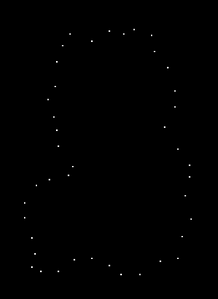 Dotted outline with the art having a solid color outline.
The best option. (In most cases.) -
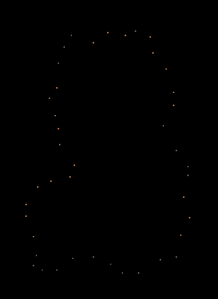 Dotted outline without the art having a solid color outline.
Good but not usually the best option. (Unless the art works much better without an outline.) -
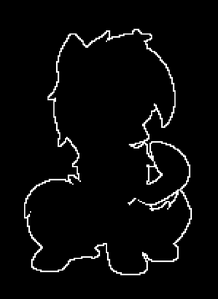 Solid outline, takes much longer to build compared to a dotted outline.
Not the best option.


Pre-style your template
In the site settings you are able to change what style you want templates to display as, but most users keep their style on "source" which simply displays the template image without doing anything extra to it.
The reason for this is that it is much less intensive on your browser to show the base image instead of converting it directly on the site. Due to this, most Pxls users/factions pre-style their templates using Clueless' /template command.
What to avoid
Abandoning your art
If you partially build your art but don't make any progress on it for a while (usually a few days to a few weeks depending when/where it was made), other users/factions will likely cover it with other art or lattice.
AI generated art
Controversial, probably best to avoid.
Caveats with lattice/background expanding
When adding a lattice or background around your art, it's best to expand naturally outwards from the art instead of outlining the lattice. This is because the borders of your lattice may grow or shrink depending on the placing speed of other users/factions making lattices. It is also seen by some as a bit rude.
Generally lattice claiming is seen as a "first come, first served" sort of deal, with the exception being some users may want their art to be fully surrounded by their lattice which most factions will respect.
-
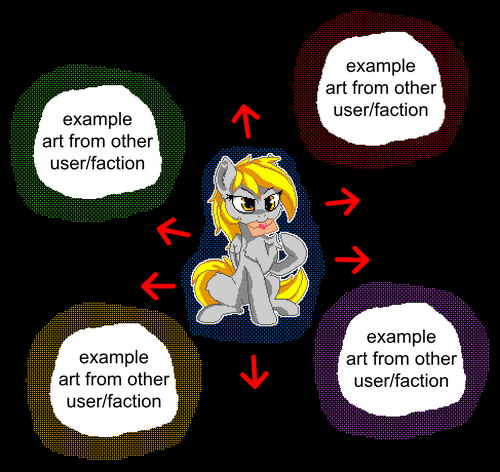 Do.
Do. -
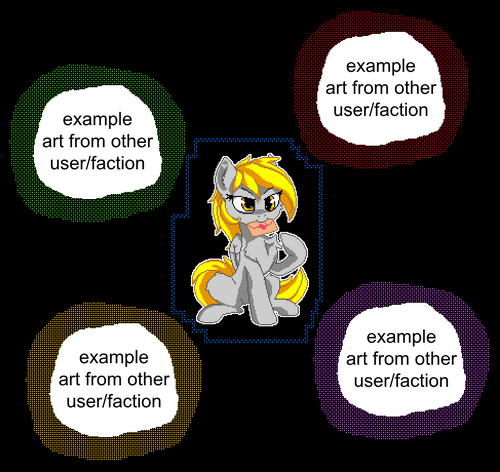 Don't.


Low effort art
Things like flat country flags, auto-converted (fiddled) art, and video game sprites are generally looked down upon and sometimes griefed.
Making art that has been built on a previous canvas is also generally looked down upon in most cases. The exceptions to this are small egos which some users build on every canvas without issue, and critters.
-
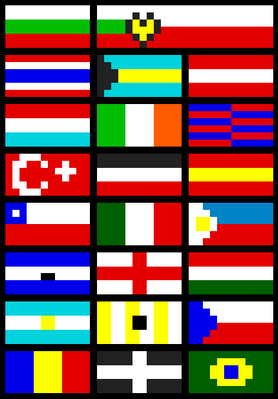 Flat flags, built hundreds of times on previous canvases, usually griefed.
 -
 High quality flags, almost never griefed.


Overclaiming
Make sure you have the placing speed to complete your art in a reasonable amount of time (usually a couple weeks), or other users/factions may cover it with other art or lattice.
Touching outlines
Some users/factions don't like when other art directly contacts their art, and may even grief it due to this. Try to keep a gap of at least 1 pixel (the bigger the gap is the better) between your art and others.
